
Resources
CoBex Recorders has designed and developed a broad range of precision electronic recorders for effective management of products and tests. Single-Pen Recorders monitor inputs and provide hard-copy output. Two-Pen Recorders monitor independent inputs on each system allowing one unit to do the work of two. The OEM Recorders are designed to fit in the manufacturer's cabinet and the Temperature / Humidity Recorders provide exact measurements on the same chart.
Below is a list of Support Documentation for you to download & use when working with CoBex Recorder products.
 Recorder Manual
Installation, Operation and Service Instructions
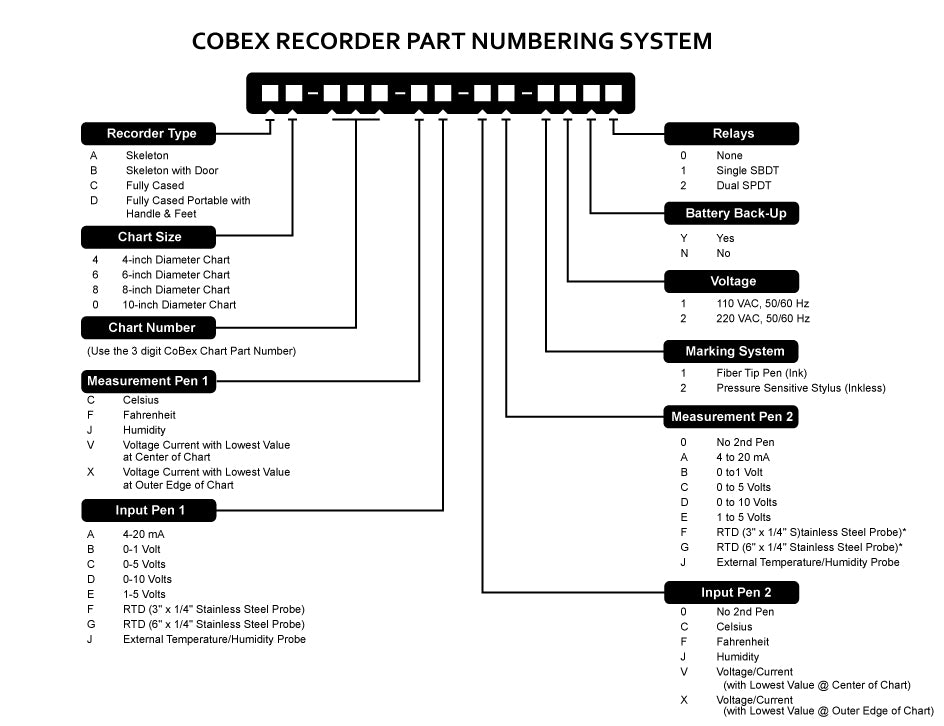 CoBex Recorder Part Numbering System (Visual instructions)
 CoBex CX9000 Part Numbering System (Visual instructions)
How To Change the Range of Your Recorder
Instructions on how to change the range on your recorder from one preset range to another
Find Your Serial Number
Instructions on how to locate the Serial Number, Model Number and Range(s) of your Chart Recorder